This one definitely took more time than I initially expected, and before I devote even more to it I would very much like to hear your opinion. Do you find it useful? Which way should the development be going? But first things first?
Have you ever found yourself:
having to make a mundane change to a large number of pages?
in need of getting statistics on page properties or page type usages?
being curious of e.g. what’s the oldest page on your site?
having to copy or move a large number of files from one folder to another or between versioning and non versioning virtual path providers?
renaming or deleting files in your file store en-masse?
If the answer to any of those (and more) is a ?yes!?, I believe you might find my little plugin useful.
Aparently I have written something on that note before for CMS 4 and it looks like someone still needs it as I got a request for an updated version for it a couple of days ago. So here we go:
for the most part the syntax for the call is equivalent to what is was before so go to my previous article regarding that (check out the old article for details). What I’ve added this time around is:
Have you ever (or have your customers) created and edited a page in one language only to realize that their selected locale was wrong? Have you ever wished you could delete a master language branch of a page after creating its localized counterpart but you could only delete the newly created slave language instead? Have a customer ever requested that they could copy a whole branch and you convert it to another language so that they could then translate in-place?
With the culture of knowledge sharing and open source spreading, everyone races to show they have something valuable that you may want. And while you may not ask for money for your content you may still want to get something in return, say a contact, an email address that’s verified (or not), to keep in touch with the consumer of your content.
Yet a full fledged registration doesn’t seem like a proper thing to do – cluttering your EPiServer user repository with (let’s face it – for a large part fake or temporary email addresses that user create only to get your content).
Once you’ll update the framework to the extended one, you will immediately notice that… nothing has changed. Hmm… did something go wrong?
Well, not really. By default the framework will be run in the “legacy mode”. Thanks to an old article by our own Marek Blotny, I’ve learned how to build Plugin settings which are just perfect for the purpose!
So to configure and enable the new features you need to open your admin UI and in the “Config” click on the “Plugin Manager” item and select our framework plugin as shown in the picture
Back in the day when we started designing our last project we’ve been presented with a following problem – a big number of templates with slightly different sidebars.
Hmm…
Is sidebar a part of content? No, rather not. We don’t want the editors to have to setup the sidebar for every article they write (and the site has a few dozens of articles created on it every day).
Is sidebar more of a template thing? Well… more like it, but still… we have articles all over the site with different sidebar elements when the articles are in different parts of the site (ok so we could add rules what controls display in which part of the site). But wait! There’s more! The sidebar will be different for every language (region). Now we’re talking a dozen of templates or a rules engine just to make the sidebar different. Customising the template with properties isn’t ideal either as it makes EPiServer UI very cluttered. Additionally we want to change sidebars across many templates so the whole branch/section of the site will be able to share the same sidebar.
You’re editing your EPiServer 4 project and suddenly the edit mode stops working. the server reports compilation errors. something along the lines:
Compiler error: CS0433: Type ?EPiServer.Global? exists in ?c:\WINDOWS\assembly\GAC_MSIL\EPiServer\5.1.422.122__8fe83dea738b45b7\EPiServer.dll? and ?c:\WINDOWS\assembly\GAC\EPiServer\4.61.5.83__8fe83dea738b45b7\EPiServer.dll?
The solution is to go to your web.config and edit the compilation section. The section will most probably look something like this:
in my case only the 4th line referencing the EPiServer.dll was interfering with the editing working, but this can easily be trimmed to only first 3 options, so once you’re done with removing CMS5 entries it could look something like:
The configuration of the module is a descendant of any EPiServer Virtual Path Provider configuration. This aspect is fairly well described on EPiServer pages.
A sample configuration for the TextImageVirtualPathProvider can look as follows
physicalPath is where the cached version of images will be stored
shownInFileManager is “false” as there is nothing to present for the user in the file manager.
allowedReferrers is the regular expression containing the filter for sites that are allowed to access the path provider and get images. This has been added so that your server does not turn into the internet’s text-image open service :)
allowNullReferrer should be set to false in production environment but allows for testing by directly creating URL’s without using a page to fill in the referrer.
replacementStrings – this one actually turned out to be very useful since some characters are invalid and not even reaching the VPP if EPiServer or ASP detects them. so to allow for characters like colon or < or even a dot (which would make it hard to form regular expression if it was explicitly available) or * you need to create an escape token for them. The string is a coma separated list of token,value,token,value,…
virtualPath is something you need to change if you want your VPP to serve images under a different root level folder. (e.g. if you have a page with that name already)
Additionally for IIS6 (most common scenario) you need to add node to configuration for the VPP to work.
The module code is already available on Epicode SVN, the relevant wiki pages will be following as soon as documentation is complete.
The use case is as follows:
The client wants the site to look exactly as in a template provided as a image,
the text is using a non standard font that is not available on 60% of Windows machines,
the site does not use flash.
the site needs to be equally good looking in IE6 (more about it later)
The solution was to generate images, but how to do it the right way? This has presented us with a once-in-a-lifetime :) opportunity to create a virtual path provider, do something good and learn something new & cool in the process.
I’m really glad to notice that Marek is getting into blogging about EPiServer. Marek is a really bright developer and a colleague at Cognifide with a number of successful EPiServer projects in his portfolio, we’ve worked together on Faceted Navigation (he’s the brain behind all the nifty editors in it) that I’m working on open sourcing of currently, and on the Setanta Sports Portal and the Setanta corporate site projects. Now he’s out in the wild writing about it. Go ahead and read his analysis on the performance of Episerver 4.x versus CMS 5. It appears that the CMS is getting… nah… I won’t spoil it for you… Read all about it on Marek’s brand new blog!
This article is a part of the series describing the faceted navigation system for EPiServer that we have developed in Cognifide and that’s already proven to be a robust solution for delivering tagged content a heavy traffic site. The engine will be released shortly as an open source project.
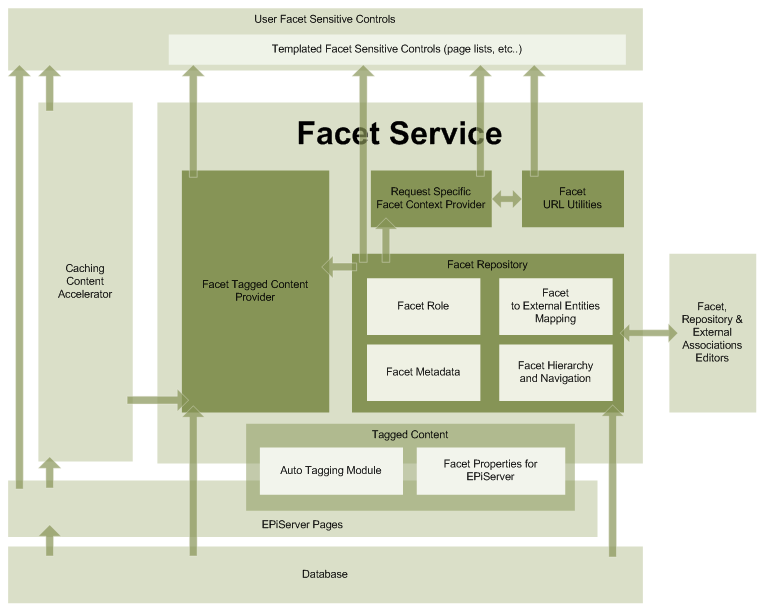
So how is the faceted engine structured?
Content provider
As you can see the driving force behind the engine is the Facet Tagged Content Provider. If you know EPiServer, the basic functionality of the module is roughly an an equivalent of find page with criteria for categories, which allows for searching pages tagged with facets with exclusion of some other facets and tagged some optional data, the module however is paging and and allows you to plug a feedback event handler so that your controls can accept or deny a story before they are sent to is and take part in the paging. The stories are provided to you in reverse order of publishing so you always get the latest stories first, (pretty much what any blog and any news site wants).
This article is the second of a series describing the faceted navigation system for EPiServer that we have internally developed in Cognifide, that’s already proven to be a robust solution for delivering tagged content a heavy traffic site, which will be released shortly as an open source project.
First of all we have to explain the nomenclature as it is going to be used quite a bit. A few terms we use pretty extensively are:
…with an unconventional approach to data fetching.
This article is a first of a series describing the faceted navigation system for EPiServer that we have internally developed in Cognifide and that’s already proven to be a robust solution for delivering tagged content a heavy traffic site, which will be released shortly as an open source project. The article outlines some pitfalls of EPiServer that we’ve run into and the nature of the project in which the module was used first and which influenced a lot of our design decisions.
This is a slightly dated post (written around November last year), that I forgot to post some time ago, so bare in mind, we’ve already started working on the faceted navigation getting open source status and I’ve updated the first sentece to include Adam Matusiak joining our team - Welcome Adam!
Over the last month or two our hive mind has assimilated two new voices, our thoughts have become one with Greg’s, and Adam’s.
As much as I seem to be enjoying my trip with EpiServer there are some little things I don’t seem to appreciate all that much and I’m not quite sure how to work around some of them in an elegant way.
EpiServer has a fairly advanced way of dealing with properties but it also seems to be a bit tough on the developer whenever you try to do something more than just strictly using its API-s. One of the areas I don’t really enjoy is the dealing with the pages that are expired or generally unavailable for the user for various reasons.
I’ve discovered yesterday on Steve’s blog that him and our other friends on EpiCode have gathered on IRC (something I’ve been lobbying here at our company for quite a while). Come, drop by, let’s meet!
I’ll definitely try to hang out there as much as I can. great to meet you guys.
As Steve suggests - grab yourself a copy of XChat or aMirc, connect to irc.freenode.net and /join #epicode
What a great idea!