Once you’ll update the framework to the extended one, you will immediately notice that… nothing has changed. Hmm… did something go wrong?
Well, not really. By default the framework will be run in the “legacy mode”. Thanks to an old article by our own Marek Blotny, I’ve learned how to build Plugin settings which are just perfect for the purpose!
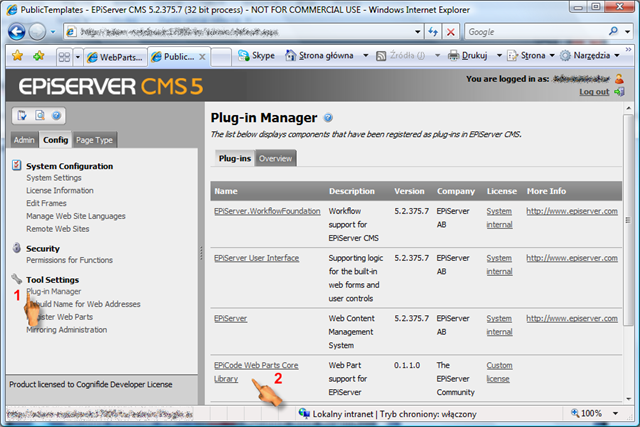
So to configure and enable the new features you need to open your admin UI and in the “Config” click on the “Plugin Manager” item and select our framework plugin as shown in the picture
The available options are:
| Setting Name | Meaning | Sample |
| Default WebParts Path Pattern | The pattern to be used when no pattern is defined for a page. | %inherit% |
| WebParts Path Patterns | The semicolon separated pairs of pattern;pattern name; This is the part you will want to customize most. | %template% |
| Cache WebParts in Memory | Determines whether the WebParts are to be cached between usages (this is useful for a small set of WebParts (like a number of sidebars) but rather discouraged if you use the legacy mode as there can be a lot of those in such case. | unchecked by default (check to improve performance in sidebar mode) |
| Legacy WebParts Support (per-page only) | If checked, disables the extensions described by this blog. | checked by default (uncheck to enable the sidebar extensions) |
As shown here:
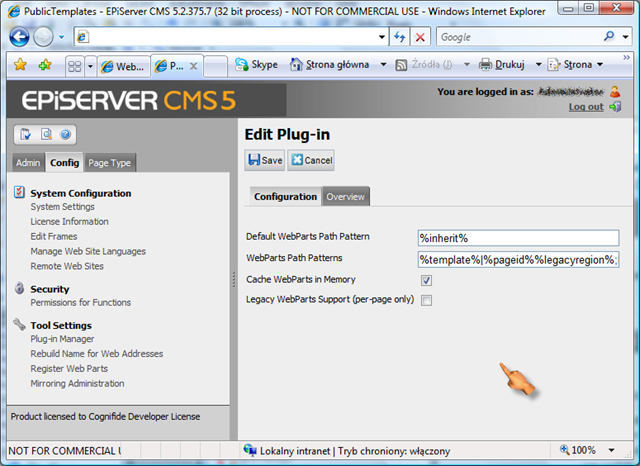
Once you fill in the settings as they are suggested in the above table the context menu (or adjust to your needs) will show you the new options:
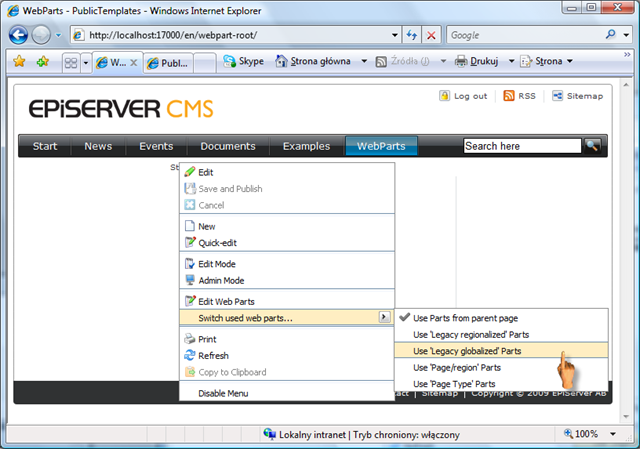
The new sub menu will allow you to change the pattern by which the WebParts are selected, while “Edit Web Parts” option will enable you to edit the WebParts for the current effective WebPart set.
First of all – if you want to select a pattern on a page you need a means of storing it. At this moment The framework does it in a property. Which means - for every page type that wants to redefine the web parts rather than using the default pattern (in our case %inherited%) you need to add String property with a “WebPartsPath” name (I may actually add some routines to add the property definition automatically if there will be enough demand for that).
What does “Effective WebPart Set” mean?
Assuming (which is the most interesting scenario) that %inherit% is the default pattern the following is true:
| Page | WebPartsPath | Effective path | Description |
| Start | %root% | Since it’s a start page and it does not define path %root% is used. | |
| + News | %root% | inherits from start page which does not define path but inherits from %root%. | |
| + Events | page | %pageid% | page |
| + Partner Day | %inherit% | page | |
| + International | page | %pageid% | %region% |
| + Sweden | %inherit% | page | |
| + England | %inherit% | page |
Once you select the effective web parts for the page or just agree with the WebParts pre-selected for you based on the default path you can edit them just like previously. Mind that when you edit WebParts on a page all the pages that have the same “effective path” are going to change as well. (which was our intention in the first place).
The library extension is going to be posted on Epicode as soon as I get a hold of Steve to approve the changes :)
Comments